
When multiple pages on your website target the exact same keyword or search intent, you create an issue known as keyword cannibalization. Instead of signaling authority to search engines, your pages compete against each other in the SERPs (Search Engine Result Pages).
Keyword cannibalization dilutes page authority, splits internal anchor text signals, confuses Google's indexing algorithms, and ultimately leads to fluctuating or declining organic rankings. In this guide, we break down how to detect keyword cannibalization using free and paid SEO tools, and how to resolve it step-by-step in 2026.
Why Keyword Cannibalization Hurts Your SEO
- Split Page Authority & Backlinks: Instead of building backlinks and authority toward one master guide, incoming links get fragmented across multiple thin pages.
- Fluctuating SERP Rankings: Google constantly swaps the ranking URL in search results, causing instability in click-through rates (CTR).
- Wasted Crawl Budget: Search engine bots spend valuable resources crawling duplicate or highly similar content instead of indexing high-converting pages.
- Lower Conversion Rates: Traffic may end up landing on an outdated or low-converting page instead of your primary sales or pillar page.
1. How to Identify Keyword Cannibalization
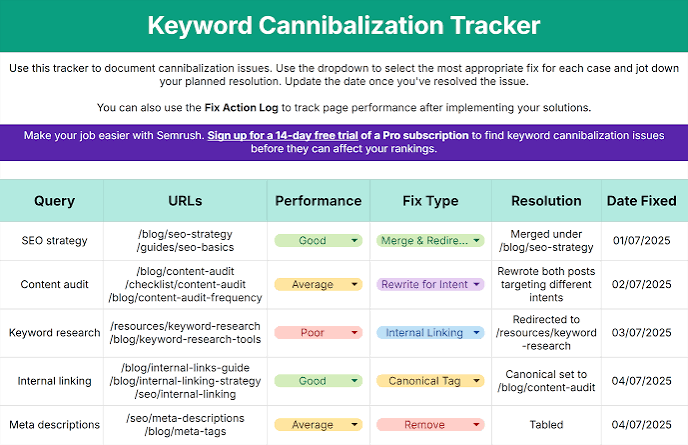
Identifying multiple URLs competing for the same search query inside Google Search Console.
Before fixing the issue, you must audit your domain to find overlapping keywords and URLs. Here are the two most effective methods:
Method A: Using Google Search Console (Free)
- Log into Google Search Console and navigate to the Performance / Search Results tab.
- Filter by a specific target keyword using the Query filter.
- Click on the Pages tab underneath the performance graph.
- If two or more URLs receive impressions and clicks for that exact query, you have identified keyword cannibalization.
Method B: Google Site Search Operator
Run a search query directly on Google using: site:yourwebsite.com "target keyword". Review the indexed pages listed in order. If multiple pages share nearly identical titles and content topics, they are likely cannibalizing each other.
2. Step-by-Step Solutions to Fix Cannibalization
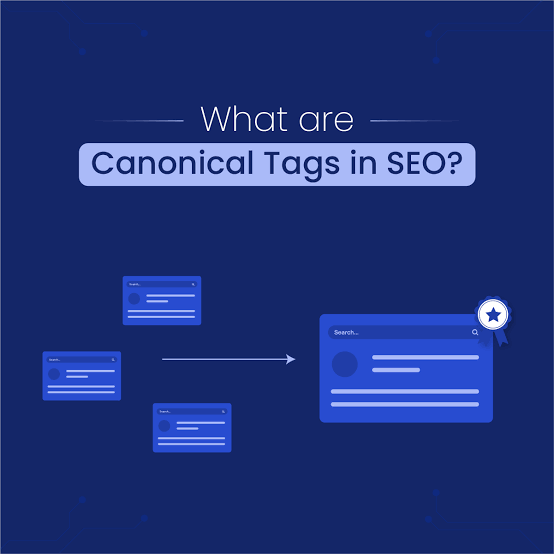
Content consolidation strategy: Merging weak secondary pages into a single pillar resource with 301 redirects.
Once you identify cannibalized pages, select one of the following resolution strategies based on your content goals:
1. Content Consolidation & 301 Redirects (Best Practice)
Combine the valuable insights, statistics, and sections from weaker secondary pages into your strongest "pillar" article. Once updated, set up 301 permanent redirects from the old URLs to the primary URL to pass existing link equity.
2. Canonical Tags (Rel="canonical")
If you must keep both pages active for user experience (e.g., separate product variations or landing pages), add a canonical tag pointing from the secondary page to the main authoritative URL.
3. Intent De-optimization & Keyword Refocusing
Re-evaluate the search intent of both pages. Modify headers (H1, H2), title tags, and content of one page to focus on a distinct long-tail variation, separating its intent from the primary keyword.
Summary Checklist for 2026
| Scenario | Recommended Action | SEO Benefit |
|---|---|---|
| Two articles covering the exact same topic | Merge content & 301 redirect lower performer | Consolidates page authority & backlinks |
| Separate landing pages required for UX | Implement rel="canonical" tag |
Prevents duplicate content penalties |
| Overlapping long-tail subtopics | Refocus H2 headings & metadata target keywords | Clarifies unique search intent for Google |



0 Comments